
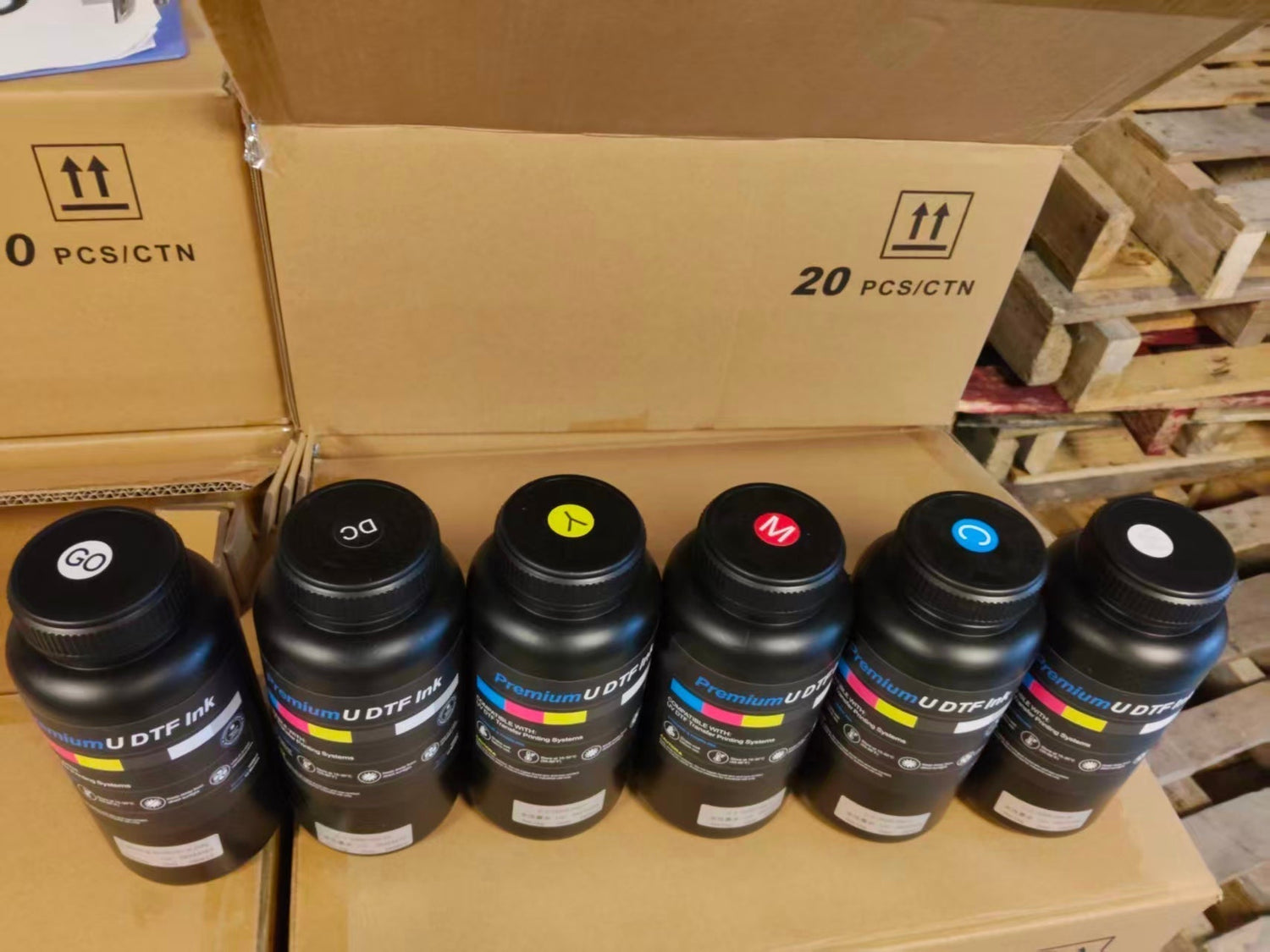
If you run a UV DTF printer, you already know the sinking feeling: you print a nozzle check, half the white channels are missing, and your first instinct is to blame the printhead. Before you order a replacement i3200-U1 or XP600 head, it's worth asking a different question — is this actually a printhead failure, or is it UV DTF ink clogging the printhead because of how the ink was stored and mixed?
In our experience supplying UV DTF ink to print shops, the vast majority of "dead printhead" complaints trace back to three preventable habits: skipping the shake routine, leaving bottles in a hot garage or a cold warehouse corner, and not knowing how to read a nozzle check before reaching for the cleaning cartridge. This guide walks through how to diagnose the real cause, why white ink is almost always the first channel to fail, and the storage and maintenance routine that keeps ink flowing instead of settling.
The Nozzle Check Test: Is It Ink or Printhead?
Before you touch a cleaning solution or call a repair tech, print a nozzle check pattern. This single test tells you whether you're dealing with a UV DTF nozzle check failing because of separated ink or an actual hardware fault, and misreading it is the #1 reason shops replace printheads that didn't need replacing.
Here's how to read the pattern:
- Thin, broken, or wavy lines across scattered channels — this is a classic sign of air bubbles or ink that hasn't been mixed, not a dead nozzle. Ink viscosity fixes almost always resolve this within one or two cleaning cycles.
- A full row or block of missing lines, consistently in the same spot after repeated cleaning cycles — this pattern is more consistent with a physical clog or, less commonly, a damaged nozzle plate.
- White channels missing while CMYK channels print cleanly — this is the single most common pattern shops report, and it points almost exclusively toward UV DTF white ink settling in the bottle or damper, not printhead damage.
- Missing lines that return immediately after a successful clean — if the pattern clears after a manual clean but reappears within minutes, the ink itself is likely too viscous or still separated, not the printhead seals.
The rule of thumb: if a manual or automatic clean noticeably improves the pattern, even partially, the ink is the more likely cause. Printhead damage typically does not respond to repeated cleaning cycles at all. Run 2–3 cleaning cycles before concluding you have a hardware issue — and always check whether the white ink bottle or damper was shaken and warmed to room temperature first.
Why White Ink Clogs First — Pigment Settling Explained
White ink is chemically different from CMYK UV DTF ink, and that difference is exactly why it clogs first. CMYK inks are dye- or fine-pigment-based with a relatively uniform particle size. White ink relies on titanium dioxide (TiO₂) particles for opacity — particles that are physically heavier and larger than the pigments used in color channels. That single fact explains almost everything about why UV DTF ink separates in the bottle overwhelmingly in white ink specifically.
Density Differences Cause Sedimentation
TiO₂ has a specific gravity roughly four to five times that of the UV-curable resin carrier it's suspended in. Left undisturbed, gravity pulls those particles downward faster than in any other channel. This isn't a manufacturing defect — it's basic physics, and it applies to every UV DTF white ink on the market to some degree. The difference between a good and a mediocre formula is how slowly and how evenly that settling happens, and how easily it re-suspends when shaken.
Sitting Unshaken for Too Long
Most UV DTF white ink shows visible sediment at the bottom of the bottle after roughly 24–48 hours of sitting completely still, and a printer that's idle over a weekend or a slow week is exactly when this happens. The damper and ink lines sit even longer without agitation than the bottle does, since most shake routines only cover the source bottle. If your shop has any days where the printer doesn't run at all, that's the gap where sedimentation quietly builds up before it shows as a failed nozzle check on Monday morning.
Storage Temperature Too High or Too Low
UV-curable resin carriers are viscosity-sensitive to temperature. Store bottles somewhere too warm (near a window, next to a heater, in an un-air-conditioned storage room during summer) and the resin can begin to cure prematurely or thin unevenly. Store them somewhere too cold and viscosity rises sharply, making particles harder to re-suspend even after shaking and slowing the ink's flow through the damper and nozzles. A stable range in the 60–80°F (16–27°C) window, out of direct sunlight, is the safest storage target for most UV DTF ink formulas.
Ink Viscosity & Shelf Life Comparison Table
Use this table as a quick reference for how each ink channel behaves, and how often it needs attention.
| Ink Type | Typical Viscosity (25°C) | Settling Speed | Recommended Shake Frequency | Shelf Life After Opening |
|---|---|---|---|---|
| CMY UV DTF Ink | ~10–14 cP | Low | Weekly, or before long idle periods | 12+ months, stored properly |
| Black (K) UV DTF Ink | ~10–15 cP | Low–Medium | Weekly | 12+ months, stored properly |
| Standard/Generic White UV DTF Ink | ~14–18 cP | High | Daily, before every print session | 3–6 months once opened |
| Low-Sediment White UV DTF Ink (factory-matched formulas) | ~12–16 cP | Medium | Daily recommended, more forgiving between shakes | Up to 24 months with proper storage |
Viscosity naturally rises as ink cools and falls as it warms, which is why a bottle brought in from a cold storage room needs time to reach room temperature before shaking — shaking cold, thick ink is far less effective at fully re-suspending settled pigment than shaking ink that's already at operating temperature.
How to Revive a Clogged Printhead
If your nozzle check points to ink rather than hardware, follow this sequence before escalating to a technician.
- Isolate the affected channel. Confirm from the nozzle check exactly which color (usually white) is missing lines, so you don't over-clean channels that are already fine.
- Bring the ink to room temperature. If the bottle or cartridge has been in a cold room, let it sit at ambient shop temperature for 30–60 minutes before doing anything else.
- Shake the source bottle thoroughly. Invert and shake for a full 3–5 minutes for white ink specifically — a quick 10-second shake is not enough to fully re-suspend settled TiO₂ particles.
- Soak the printhead in cleaning solution, don't just flush it. Remove the printhead per your printer's manual and let it soak nozzle-side-down in a shallow tray of manufacturer-approved UV DTF cleaning solution for 15–30 minutes. Soaking dissolves cured or semi-cured resin around the nozzle plate far more effectively than a quick rinse.
- Run a manual ink line purge before printing. Cycle a small amount of ink through the lines and damper to clear any settled sediment sitting between the bottle and the printhead — this step is often skipped and is a common reason clogs return within a day.
- Use gentle syringe pressure only. If you're manually pulling cleaning solution through the head with a syringe, apply slow, even pressure. Excess force can blow out the nozzle plate seals or force air bubbles into the ink chamber, creating a new problem while trying to solve the old one.
- Reinstall and run 2–3 nozzle checks. Don't judge success on a single check — settled sediment can take more than one cleaning cycle to fully clear the ink path.
- If the pattern hasn't improved after 3 cleaning cycles, the issue is more likely a genuine hardware fault, and it's time to involve a technician rather than continuing to clean.
Daily & Weekly Ink Maintenance Routine
A consistent shake routine prevents the vast majority of clogging issues before they start. Here's a simple schedule to post near your printer:
| Task | Frequency |
|---|---|
| Shake white ink bottle/cartridge | Daily, before first print job |
| Shake CMYK bottles | Weekly, or after any idle period over 3 days |
| Run a nozzle check | Start of every shift |
| Manual ink line purge | Weekly, or immediately after refilling |
| Check storage room temperature | Weekly |
| Full printhead soak-clean | Monthly, or at first sign of a persistent nozzle check failure |
For a complete walkthrough of daily, weekly, and monthly UV DTF equipment care beyond ink — including film handling, RIP calibration checks, and printer environment setup — see our full UV DTF Equipment Maintenance Checklist.
Why Piezo-Safe, Low-Sediment Formula Matters
Here's the part most shops don't realize until they've gone through a few printhead replacements: a lot of "clogging" is really a formula problem, not an operator problem. Generic or poorly milled white ink separates faster, re-suspends less completely, and is simply less forgiving of the everyday realities of running a busy shop — missed shake days, a warm afternoon, a slow week.
We formulate and factory-match our UV DTF ink specifically for the Epson i3200-U1 and XP600 printheads used in most UV DTF setups, with a low-sediment white ink formula built to stay in suspension longer between shakes and jet cleanly through fine piezo nozzles without the aggressive pigment load that causes premature wear.
SHL UV DTF Ink — CMYKW, 1000ml
- Factory-matched to Epson i3200-U1 and XP600 printheads
- High-opacity white with a low-sediment formula for smoother, more consistent jetting
- ISO9001 / CE / RoHS / REACH certified
- 24-month shelf warranty with a 1:1 replacement policy
Switching to a piezo-safe, low-sediment formula doesn't eliminate the need for a shake routine — physics still applies — but it widens your margin for error considerably, which matters when your shop is busy and shaking bottles isn't always top of mind.
Order Locally, Get Support Locally
Because we stock and ship from our own facility, you're not waiting on ink that's crossed an ocean and sat in a customs warehouse before it reaches your printer — and if something ever does arrive off-spec, you're talking to the people who made it, not a reseller.
SHL LA Supply — 12155 Mora Dr, Santa Fe Springs, CA 90670
Phone: 562-203-5165 | Email: info@shl-supply.com
Hours: Monday–Friday, 9:00am–5:00pm (PT)
Shipping: Orders ship within 48 hours; free shipping on orders over $799; local pickup available at our Santa Fe Springs location
After-Sales: Backed by our money-back guarantee — report any defect within 5 days of receipt and we'll issue a free replacement or return, no 15–35% restocking fee applied to defective items
FAQ
How often should I shake UV DTF white ink?
Shake white ink daily, before the first print job of the day, for a full 3–5 minutes rather than a quick 10-second shake. If the printer sits idle for more than a day or two, shake again before printing — settled TiO₂ particles build up quickly and a longer, more thorough shake is needed to fully re-suspend them.
Can I still use UV DTF ink after the shelf-life date has passed?
It depends on how it was stored and what you see when you open it. If the ink has been kept within the recommended temperature range and shakes back to a smooth, uniform consistency with no clumping or separation that won't re-suspend, many shops can still use it — but print quality and clog resistance both decline past the recommended window, and white ink degrades faster than CMYK. When in doubt, especially for client-facing print runs, don't risk a batch of expired white ink; the cost of a clogged head or a bad print run outweighs the cost of a fresh bottle.
Do I need to flush the ink lines before switching UV DTF ink brands?
Yes. Different manufacturers use different resin carriers and pigment dispersants, and mixing formulas — even briefly — inside the damper or ink lines can cause the pigments to flocculate (clump together) rather than staying suspended. Fully purge and, ideally, clean the ink path with a compatible flushing solution before introducing a new brand, especially for white ink.
Can UV DTF cleaning solution be used interchangeably between brands?
Not always safely. Cleaning solutions are formulated to match specific resin chemistries, and using a cleaning solution designed for a different ink system can leave residue that reacts poorly with your current ink, potentially causing more clogging rather than less. When switching ink brands or if you're unsure of compatibility, use the cleaning solution recommended by your ink manufacturer, or contact their support team before mixing systems.

Leave a comment
This site is protected by hCaptcha and the hCaptcha Privacy Policy and Terms of Service apply.