
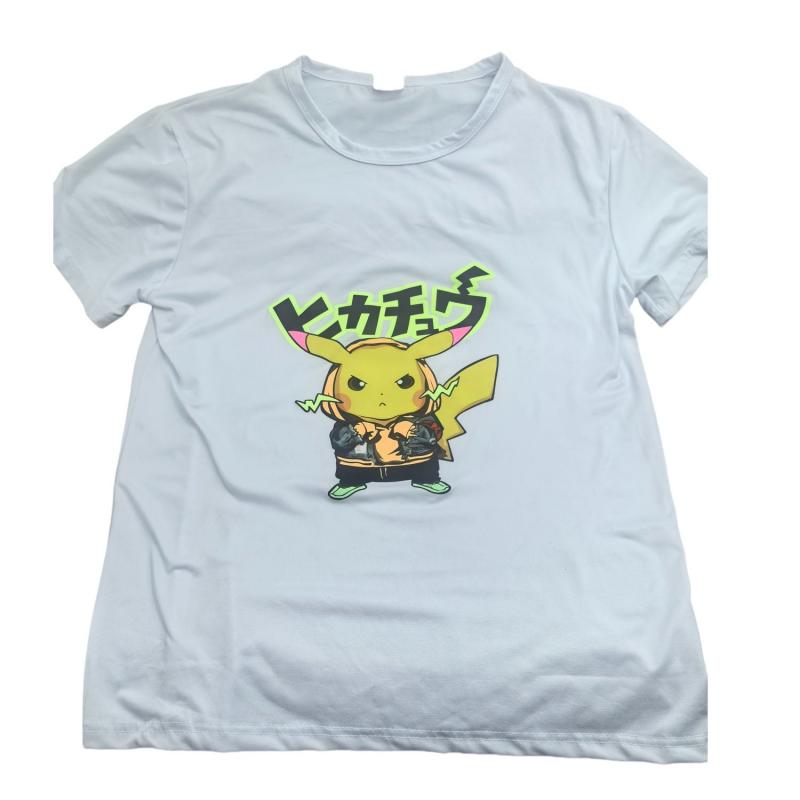
Polyester is everywhere in the U.S. market—performance tees, sports jerseys, corporate polos, and moisture-wicking athletic wear. But on press, it doesn’t behave like cotton. That’s why screen printing color migration is one of the most common surprises shops face.

The classic fail looks harmless at first. A clean white logo comes off the press on a red polyester shirt, then the dryer hits about 320°F. Minutes later—or after the job cools—the white starts to shift pink. That’s white ink bleeding driven by polyester dye migration.
This isn’t just “bad ink” or a dirty screen. It’s a heat-triggered form of dye migration tied to how polyester is colored with disperse dyes. Under heat, dyes can move and stain the ink film, causing halos, blotchy coverage, and polyester bleeding in white ink prints.
What makes it costly is timing. The print can look perfect at pickup, then change hours, days, or even weeks later. When dye sublimation and dye sublimation in printing show up after delivery, it leads to reprints, wasted blanks, and unhappy customers.
What causes polyester dye migration and white ink bleeding?
When a print looks clean at first but changes later, the fabric is often to blame. Polyester dye migration can cause a tint, halo, or dull cast that messes up crisp artwork. In busy shops, this is often mistaken for ink failure, even if the ink looks fine.

Defining dye migration (polyester bleeding) in screen printing
Dye migration happens when colorants move from the fabric into the ink layer during heat. In polyester, the dye can move up, which is why it's common in athletic wear and performance blends.
In screen printing, heat is the main cause: flash, cure, or a second dryer trip. Similar issues can happen after heat transfer printing, because the press temperature and time can push dyes into the print.
Why white and light inks show contamination first
White ink bleeding is easy to notice because small dye amounts change the shade quickly. A bright white can turn pink on red fabric, or pick up a gray-green haze on certain blues and blacks.
This isn't just a visual problem; it affects contrast and makes details look dirty. Light pastels and grays can also change, but white usually shows the issue first.
Why dye migration can appear hours, days, or weeks after printing
Some dye migration starts during curing, then keeps going as the garment stays warm. This is why the print might look good at first but fail later.
Heat exposure can also happen after production. A hot delivery truck, a re-press, or a customer using high heat can start dye sublimation again. This can move color through the ink film over time.
How disperse dyes and dye sublimation in printing trigger color shift
Polyester can look fine at first but then surprise you after it's cured. This is because the dye in the fabric moves when it gets hot and stays hot for a while. This movement can cause the fabric to change color, leading to white ink bleeding and a dull finish.
When the fabric releases color, it can quickly change the look of white ink prints. This risk is higher when the press uses hotter, longer curing times to make the ink look opaque.

Why polyester is dyed with disperse dyes (heat-activated chemistry)
Polyester is like plastic, so it doesn't absorb water-based colors like cotton does. Instead, it uses disperse dyes that move with heat. This is similar to dye sublimation in printing, where color changes with high temperature.
In dye sublimation, the dye turns into a gas, the polyester fiber opens, and the dye molecules get in. When it cools down, the fiber closes, trapping the color inside. But this "lock-in" isn't always strong enough to stop later heat-activated dyes from moving.
How standard curing temperatures can reactivate dyes
Many shops aim for a cure temperature of 320–330°F for plastisol. This range can also reactivate dyes, making dye sublimation happen on the press. If the ink is soft during cure, the dye can move up and tint the white ink.
This is why polyester dye migration might not show right away. As the print cools and sits, the dye can keep moving. This can stain the ink layer, making it look like white ink bleeding, even if the ink is fine.
Temperature ranges commonly associated with risk (from ~265°F to 330°F)
Some disperse dyes can start to move just above 265°F, more so on bright or heavily dyed fabrics. Cure temperatures near 320–330°F can make this reaction stronger. Even lower temperatures can cause problems if the garment heats unevenly or for a long time.
- ~265°F: early activation risk for certain heat-activated dyes in polyester
- ~320–330°F: common cure targets that can intensify dye movement
- Hot spots from flashes or tight dryer chambers can raise fabric temperature beyond the set point
Why over-dyed garments can bleed unexpected colors
Over-dyed polyester can have more than one dye history. A garment that looks navy might have started as red and then dyed again. Under heat, the older dyes can come back, making the stain look pink or purple instead of navy.
This is why color shift in white ink prints can seem random. Cotton behaves differently because its dyes bond in a way that doesn't mimic dye sublimation. So, the same cure profile can be calm on cotton but chaotic on polyester.
Screen printing color migration, Professional screen solutions
When a clean white turns pink or yellow, it's not just about adding more heat. Screen printing color migration is a problem of heat and time. The best solution is to control both. Many shops use Professional screen solutions that balance ink choice, cure targets, and press settings.
Low-bleed and low-cure plastisol strategies for high-opacity white ink printing
For high-opacity white ink on polyester, start with the right chemistry. Use a low-bleed ink that resists dye movement. It cures closer to 270–290°F, which helps reduce dye activation.
A low-cure ink system can cure in the 270–300°F range. It may include built-in blockers that slow dye push. These inks are more expensive but save money in the long run by reducing reprints and callbacks.
Dye-blocking underbases and when gray (or dark) blockers outperform bright white
A dye-blocking underbase adds a barrier layer before the white topcoat. On dark polyester, a gray blocker can look cleaner over time. It reduces the harsh “white-to-pink” contrast and maintains a steadier visual tone.
Controlling flash and conveyor dryer settings to reduce dye activation
Flashing is useful, but too much can heat-soak the garment and invite more dye movement. Some shops have even fought bleed with multiple screens and several flashes for a tiny print. This hurts speed and consistency.
A tighter routine—shorter flashes and cooler platen heat—often works better than stacking heat cycles. Watch ink film temperature and fabric temperature, not just dryer air readings. Many teams aim for a gentler flash approach (often around 250°F) to gel layers without driving dyes.
Immediate cooling after cure to slow post-press migration
Heat doesn't stop at the dryer exit. Rapid cooling with fans or air blowers can slow post-press migration while the print and fabric are warm. Avoid stacking hot garments, as trapped heat can keep dyes moving under the white.
This cooling step fits naturally into Professional screen solutions. It protects the finish without changing the art or ink deposit. Paired with a dye-blocking underbase and low-cure ink, it supports total screen solutions that hold up from start to finish.
Polyester printing variables that make bleeding worse on press
On press, a “clean” white can change quickly with fabric, heat, and shop conditions. Polyester bleeding often starts as a faint tint that grows after curing. It's important to watch the garment as much as the ink for professional screen solutions.
Nightmare garments are usually 100% polyester in bright team shades. Hot reds, royal blues, and kelly greens can cause vivid dye migration. The first sign is often white ink bleeding in fine details and thin strokes.
Surface treatments can make things worse. Moisture-wicking coatings can act as a barrier, so plastisol needs more pressure, dwell, or heat to lock in. This extra effort can re-activate dye. So, moisture-proof solutions like tested low-cure systems, primers, or blocker bases are worth the time.
Static is another quiet problem with synthetic fabric. Polyester attracts lint that creates pinholes and weak coverage. This makes dye tint easier to see in white. Keep a clean staging area, and check screen printing squeegee rubber for nicks that leave streaks.
- Wipe blanks with a tack cloth before loading to cut dust and fuzz.
- Use anti-static spray or anti-static bars to reduce cling on pallets.
- Watch flash height and time so thin areas don’t get overcooked.
Heat is the final variable, and polyester has less tolerance than cotton. Past the low 320°F range, you can see scorching, a glossy sheen, curling at seams, and shrinkage. When panels lift during flash, they can drift closer to the element. Controlled curing and steady airflow help keep prints stable while limiting dye movement.
Testing and quality control steps to catch dye migration before delivery
Testing is key when clean whites are important. A strict quality control process helps find dye migration early. This way, you avoid reprints and extra credits.
Good checks also help keep your profits up. This is true whether you're printing in-house or stocking up on wholesale screen printing supplies for busy weeks.
Pre-production garment assessment and test prints on the actual fabric lot
Start with the exact garment lot, not a similar style from the shelf. For polyester dye migration testing, check the fiber content and color strength. 100% polyester and vivid reds, blues, and greens are at higher risk.
Print and cure 5–10 test pieces using your planned settings. Check opacity, hand feel, and early tinting. Then, adjust before the full run using professional screen solutions that match the fabric’s bleed risk.
Verifying cure without overheating (temperature strips, ink film temp vs. air temp)
Cure verification confirms the ink reaches its target without extra heat. Temperature strips placed where the ink travels through the dryer help confirm what’s happening on the belt.
Air temp is not ink film temp. Track both, because a “safe” dryer readout can overheat the print and trigger screen printing color migration after the job is boxed.
Hold-time checks: monitoring for delayed migration (72+ hours / 24-hour shop hold)
Some bleed shows up later, not on press. Many shops use a 24-hour hold on polyester jobs to catch delayed tinting. A 72+ hour watch is even stronger for tricky styles.
During the hold, store samples at room temp and re-check whites under consistent light. Keep notes by garment color, lot, and dryer settings for the next run.
Wash testing and visual inspection standards for white ink prints
Wash testing on at least one piece confirms bonding and durability. It also reveals shifts that can appear after laundering, specially on athletic polyester.
- Color check: look for pinking, graying, or halos around fine type
- Surface check: feel for tack, excess gloss, or rough texture from too much heat
- Damage check: watch for scorch marks, dye haze, or fabric sheen changes
Pair these checks with consistent incoming materials and tools. This ensures each job runs on repeatable inputs and reliable wholesale screen printing supplies.
SHL DTF/Screen Material approach: wholesale screen printing consumables that help keep whites clean
Keeping whites clean on polyester is all about heat control, solid coverage, and post-press care. SHL DTF/Screen Material makes this easier with consistent tools. This way, results are the same no matter the fabric lot.
shl-supply.com has been helping the global printing community for years. They offer a wide range of top-notch consumables at unbeatable wholesale prices.
When colors like bright reds and royal blues can cause dye migration, many shops use transfers. shl-supply offers premium dtf film for polyester. This includes premium double matt instant peel dtf and quality dtf for tough blends.
For big jobs, the 36"x328' premium double matt instant peel dtf direct film is ready to go. Dtf direct film and instant peel film keep whites looking vibrant, even after the press.
Screen printing aims for even, high-opacity deposits with few pinholes. SHL DTF/Screen Material uses monofilament polyester mesh for this. This mesh holds stencil detail and keeps ink laydown steady.
Using a solid screen printing aluminum bare frame and dependable screen printing squeegee rubber helps too. These tools reduce rework when aiming for clean whites on polyester.
Standardizing your setup is key, as heat, time, and coverage affect print brightness. Many buyers buy key items in bulk. Then, they add production support like the 13 inch dtf printer combo package 4 in 1 for transfer jobs.
With shl-supply, the focus is on consistent outputs and fewer surprises after curing. They offer first-rate goods that fit real shop schedules.

Leave a comment
This site is protected by hCaptcha and the hCaptcha Privacy Policy and Terms of Service apply.